SQL
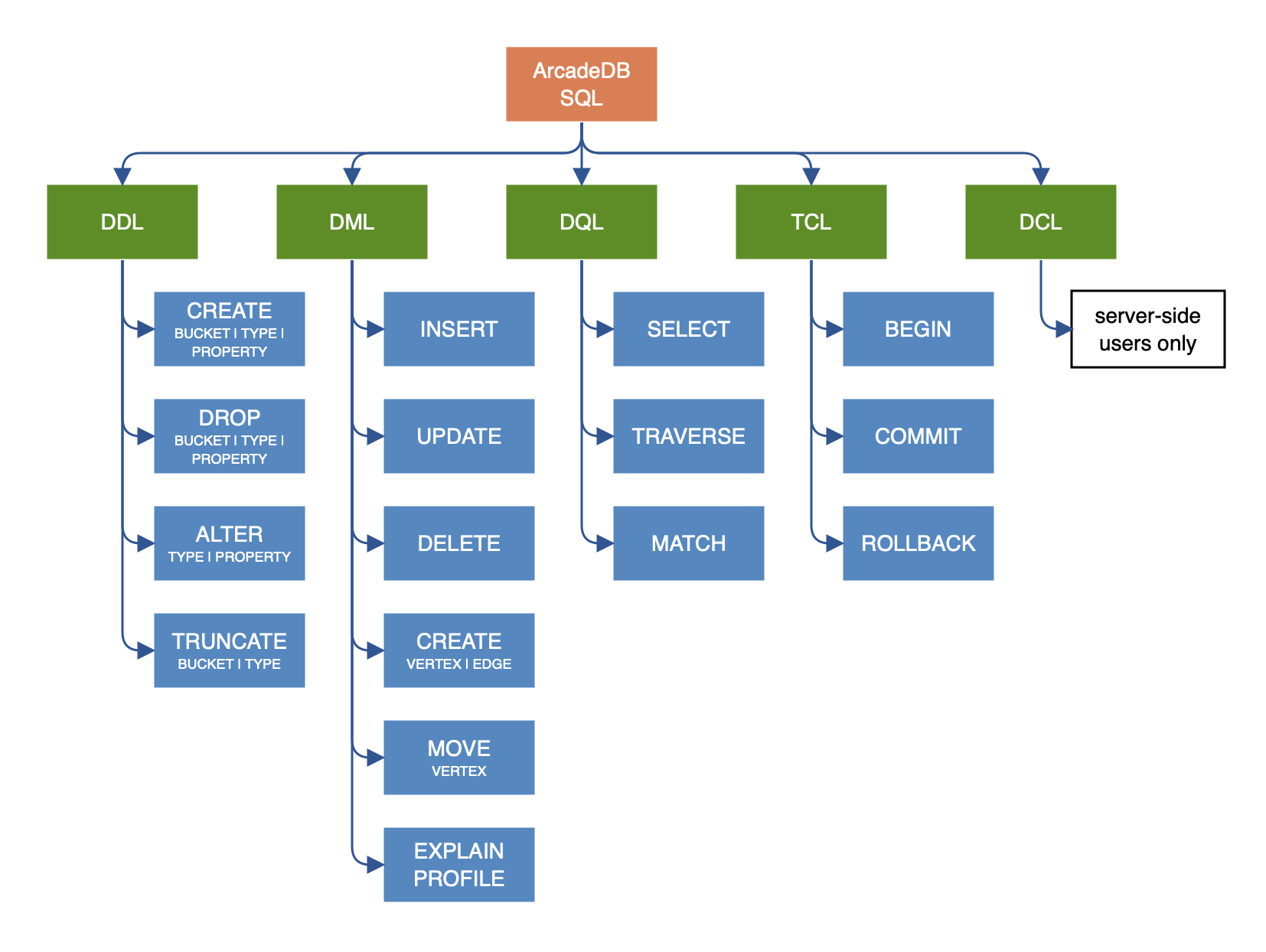
ArcadeDB speaks SQL as its primary query language, extended for graph traversal, full-text search, time series, and vector similarity. Nine out of ten developers can write their first ArcadeDB query without learning anything new — the differences are covered in the ArcadeDB SQL dialect section below.
Manipulation
SELECT, INSERT, UPDATE, DELETE, MATCH, TRAVERSE — read and write records and traverse graphs.
Schema (DDL)
Types, properties, indexes, buckets, triggers, materialized views.
Database Admin
BACKUP, RESTORE, EXPORT, IMPORT, ALTER, CHECK, ALIGN.
Inspection
EXPLAIN, PROFILE, CONSOLE — understand and tune your queries.
Query Shaping
Projections, pagination, filtering — the building blocks of every query.
Reference
Functions, methods, custom functions, SQL Script, SELECT execution model.
Introduction to SQL
When it comes to query languages, SQL is the most widely recognized standard. The majority of developers have experience and are comfortable with SQL. For this reason ArcadeDB uses SQL as its query language and adds some extensions to enable graph functionality. There are a few differences between the standard SQL syntax and that supported by ArcadeDB, but for the most part, it should feel very natural. The differences are covered in the ArcadeDB SQL dialect section of this page.
If you are looking for the most efficient way to traverse a graph, we suggest using MATCH instead.
Many SQL commands share the WHERE condition. Keywords are case insensitive, but type names, property names and values are case sensitive. In the following examples keywords are in uppercase but this is not strictly required.
For example, if you have a type MyType with a field named id, then the following SQL statements are equivalent:
SELECT * FROM MyType WHERE id = 1
select * from MyType where id = 1
The following is NOT equivalent. Notice that the field name 'ID' is not the same as 'id'.
SELECT * FROM MyType WHERE ID = 1Also the following query is NOT equivalent because of the type 'mytype ' is not the same as 'MyType'.
SELECT * FROM mytype WHERE id = 1Automatic usage of indexes
ArcadeDB allows you to execute queries against any field, indexed or not-indexed. The SQL engine automatically recognizes if any
indexes can be used to speed up execution. You can also query any indexes directly by using INDEX:<index-name> as a target.
Example:
SELECT * FROM INDEX:myIndex WHERE key = 'Jay'Extra resources
-
Match for traversing graphs
ArcadeDB SQL dialect
ArcadeDB supports SQL as a query language with some differences compared with SQL. The ArcadeDB team decided to avoid creating Yet-Another-Query-Language. Instead we started from familiar SQL with extensions to work with graphs. We prefer to focus on standards.
Learning SQL
If you want to learn SQL, there are many online courses such as:
alternatively, order a book such as:
-
or any of these.
For details on ArcadeDB’s dialect, see ArcadeDB SQL Syntax. You can also download a SQL Command Cheat Sheet (pdf).
The simplest SQL query just returns a constant, and is given by:
SELECT 1and could have practical use, for example, as a connection test. Furthermore, such constant queries can be used as a calculator:
SELECT sqrt(6.0 * 7.0)A typical ArcadeDB SQL query has the following components:
SELECT projections
FROM type
WHERE predicate
GROUP BY property
ORDER BY projection
SKIP number
LIMIT number
for further components or details, see the SELECT command. As for classic SQL the execution order in ArcadeDB SQL is:
-
FROM -
WHERE -
GROUP BY -
SELECT -
ORDER BY -
SKIP -
LIMIT
No JOINs
The most important difference between ArcadeDB and a Relational Database is that relationships are represented by LINKS instead of
JOINs.
For this reason, the typical JOIN syntax of relational databases is not supported. ArcadeDB uses the "dot (.) notation" to
navigate LINKS. Example 1 :
In SQL you might create a join such as:
SELECT *
FROM Employee A, City B
WHERE A.city = B.id
  AND B.name = 'Rome'
In ArcadeDB, an equivalent operation would be:
SELECT *
FROM Employee
WHERE city.name = 'Rome'
Another example:
SELECT *
FROM Employee A, City B, Country C
WHERE A.city = B.id
  AND B.country = C.id
  AND C.name = 'Italy'
In ArcadeDB, an equivalent operation would be:
SELECT *
FROM Employee
WHERE city.country.name = 'Italy'
Furthermore, RIDs can be resolved by nested projections.
Projection
In SQL, projections are mandatory and you can use the star character * to include all of the fields.
With ArcadeDB this type of projection is optional.
Example: In SQL to select all of the columns of Customer you would write:
SELECT * FROM CustomerIn ArcadeDB, the * may be omitted:
SELECT FROM CustomerSystem Types
ArcadeDB exposes several read-only virtual types under the schema: prefix that let you introspect the database from SQL.
They behave like any other type: projections, filters, ORDER BY, LIMIT and aggregations all work, and you can expand() collection-valued properties.
| Virtual type | What it returns |
|---|---|
|
One row per defined document/vertex/edge/timeseries type. Properties: |
|
One row per bucket (the physical storage unit). Properties: |
|
One row per index. Properties: |
|
A single row with database-wide metadata: |
|
One row per materialized view. Properties: |
|
One row per graph analytical view. Properties: |
|
One row per continuous aggregate (incremental rollup over a time-series source). Properties: |
|
One row per trigger. Properties: |
|
A single row with per-database runtime statistics ( |
|
A single row describing the database property dictionary (the internal mapping of property names to numeric ids used to keep records compact): |
Examples:
SELECT FROM schema:typesSELECT name, records FROM schema:buckets WHERE purpose = 'PRIMARY' ORDER BY records DESCSELECT FROM ( SELECT expand(settings) FROM schema:database ) WHERE key = 'arcadedb.serverMetrics'DISTINCT
You can use DISTINCT keyword exactly as in a relational database:
SELECT DISTINCT name FROM CityHAVING
ArcadeDB does not support the HAVING keyword, but with a nested query it’s easy to obtain the same result. Example in SQL:
SELECT city, sum(salary) AS salary
FROM Employee
GROUP BY city
HAVING salary > 1000
This groups all of the salaries by city and extracts the result of aggregates with the total salary greater than 1000 dollars.
In ArcadeDB the HAVING conditions go in a select statement in the predicate:
SELECT
FROM ( SELECT city, SUM(salary) AS salary FROM Employee GROUP BY city )
WHERE salary > 1000
Multiple targets
ArcadeDB allows only one type (types are equivalent to tables in this discussion) as opposed to SQL, which allows for many tables as the target.
If you want to select from 2 types, you have to execute 2 sub queries and join them with the UNIONALL function:
SELECT FROM E, VIn ArcadeDB, you can accomplish this with a few variable definitions and by using the expand function to the union:
DISTINCT vs distinct()
Query results without duplicates can be realized either using the keyword DISTINCT or the function distinct().
The keyword DISTINCT is be used if the entire projection should be unique, while the distinct function returns unique elements only for its argument field
UNWIND vs expand()
SQL Differences
Following are some basic differences between ArcadeDB and PostgreSQL.
| Postgres | ArcadeDB |
|---|---|
|
|
|
|
|
|
|
|
|
|
|
|
|
|
However, there is a SQL condition where the two systems do differ. When you use functions that do not affect the column name, SQL defines that function name as the column name. In ArcadeDB, since we’re projecting from a record, the resulting name remains the property name.
For instance, in SQL:
SELECT count(*) FROM Employeewould result in a data set with one column named "count(*)".
The ArcadeDB equivalent is:
SELECT count(*) FROM Employeeresulting in a data set with one column name of "count". If you specify a name for a column in a projection using the AS keyword, both SQL and ArcadeDB would use the provided name.
| If you prefer having the function name as the column name, like standard SQL, use AS, like: |
SELECT count(*) as _count_ FROM Employee