Automatic Backup Scheduler
ArcadeDB provides an automatic backup scheduler that runs as a server plugin. This feature allows you to configure scheduled backups for all databases with flexible scheduling options, tiered retention policies, and high availability cluster support.
The auto-backup scheduler is activated when a backup.json configuration file exists in the server’s configuration directory: config/ under the server root by default, or the directory set by arcadedb.server.configDirectory (since v26.10.1).
Features
-
Frequency-based scheduling - Run backups every N minutes
-
CRON-based scheduling - Use CRON expressions for precise scheduling (e.g., daily at 2 AM)
-
Time windows - Restrict backups to specific time periods (e.g., off-peak hours)
-
Tiered retention - Keep hourly, daily, weekly, monthly, and yearly backups
-
Per-database configuration - Override defaults for specific databases
-
HA cluster awareness - Configure which node runs backups in a cluster
-
Follows the database lifecycle - New databases are scheduled automatically, dropped or closed ones stop
-
Studio integration - Configure and monitor backups through the web UI
Configuration File
Create a file named backup.json in the config directory of your ArcadeDB installation.
The server will automatically detect this file on startup and enable the auto-backup scheduler.
{
  "version": 1,
  "enabled": true,
  "backupDirectory": "./backups",
  "defaults": {
    "enabled": true,
    "runOnServer": "$leader",
    "schedule": {
      "type": "frequency",
      "frequencyMinutes": 60,
      "timeWindow": {
        "start": "02:00",
        "end": "06:00"
      }
    },
    "retention": {
      "maxFiles": 10,
      "tiered": {
        "hourly": 24,
        "daily": 7,
        "weekly": 4,
        "monthly": 12,
        "yearly": 3
      }
    }
  },
  "databases": {
    "production": {
      "schedule": {
        "type": "cron",
        "expression": "0 0 2 * * ?"
      },
      "retention": {
        "maxFiles": 20
      }
    },
    "analytics": {
      "enabled": false
    }
  }
}
Configuration Options
Global Settings
| Setting | Default | Description |
|---|---|---|
|
|
Configuration file version (for future compatibility) |
|
|
Enable or disable the auto-backup scheduler globally |
|
|
Directory where backups are stored (must be a relative path within server root) |
The backupDirectory must be a relative path and cannot contain .. for security reasons.
Absolute paths are rejected to prevent writing outside the server directory.
|
Default Settings
The defaults section defines settings applied to all databases unless overridden.
| Setting | Default | Description |
|---|---|---|
|
|
Enable backups for databases by default |
|
|
Which server runs backups (see HA Cluster Support) |
Schedule Settings
| Setting | Default | Description |
|---|---|---|
|
|
Schedule type: |
|
|
Minutes between backups (when type is |
|
- |
CRON expression (when type is |
|
- |
Time window start (HH:mm format, e.g., "02:00") |
|
- |
Time window end (HH:mm format, e.g., "06:00") |
Retention Settings
| Setting | Default | Description |
|---|---|---|
|
|
Maximum backup files to keep per database |
|
|
Number of hourly backups to retain |
|
|
Number of daily backups to retain |
|
|
Number of weekly backups to retain |
|
|
Number of monthly backups to retain |
|
|
Number of yearly backups to retain |
When tiered retention is configured, the scheduler keeps the oldest backup of each of the most recent time buckets
of every tier, and deletes the backups no tier keeps (the most recent backup is always kept).
For example, with hourly: 24, it keeps one backup per hour for the last 24 hours. Weeks are ISO weeks, starting on
Monday, so a week that spans a year end is one bucket.
|
Since v26.10.1. Before, a weekly bucket was labelled by calendar year plus ISO week number, so the last days of December and the first week of January of the same year shared one bucket and a recent backup could be deleted in favor of one a year older. |
Per-Database Overrides
The databases section allows overriding any default setting for specific databases.
Only specify the settings you want to override; unspecified settings inherit from defaults.
{
  "databases": {
    "critical-db": {
      "schedule": {
        "type": "cron",
        "expression": "0 0 * * * ?"
      },
      "retention": {
        "maxFiles": 48,
        "tiered": {
          "hourly": 48,
          "daily": 14
        }
      }
    },
    "dev-db": {
      "enabled": false
    }
  }
}
CRON Expressions
The auto-backup scheduler supports 6-field CRON expressions:
┌───────────── second (0 - 59)
│ ┌───────────── minute (0 - 59)
│ │ ┌───────────── hour (0 - 23)
│ │ │ ┌───────────── day of month (1 - 31)
│ │ │ │ ┌───────────── month (1 - 12)
│ │ │ │ │ ┌───────────── day of week (0 - 6, Sunday = 0)
│ │ │ │ │ │
* * * * * *
| Expression | Description |
|---|---|
|
Every day at 2:00 AM |
|
Every 6 hours |
|
Every Sunday at 1:30 AM |
|
First day of every month at 3:00 AM |
|
Every weekday at midnight |
Supported special characters:
-
*- matches all values -
?- no specific value (use for day-of-week or day-of-month) -
-- range (e.g.,1-5for Monday through Friday) -
/- step (e.g.,*/15for every 15 units)
HA Cluster Support
In a high availability cluster, you can control which server performs backups using the runOnServer setting:
| Value | Description |
|---|---|
|
Only the current leader node runs backups (default, recommended) |
|
All nodes run backups independently |
|
Only the specified node runs backups (e.g., |
Using $leader is recommended because:
-
Ensures exactly one backup is created per schedule
-
Automatically fails over if the leader changes
-
Avoids duplicate backups across the cluster
{
  "defaults": {
    "runOnServer": "ArcadeDB_Replica1"
  },
  "databases": {
    "analytics": {
      "runOnServer": "ArcadeDB_Replica2"
    }
  }
}
Backup Directory Structure
Backups are organized by database name:
backups/
├── database1/
│   ├── database1-backup-20250115-020000041.zip
│   ├── database1-backup-20250116-020000038.zip
│   └── database1-backup-20250117-020000105.zip
└── database2/
    ├── database2-backup-20250115-020000062.zip
    └── database2-backup-20250116-020000057.zip
The backup filename format is: <database>-backup-<YYYYMMDD>-<HHMMSSmmm>.zip, where the last three digits are
milliseconds.
| Before 26.9.1 the name stopped at the second. Archives created by an older version keep their name and are still listed and rotated normally, so nothing needs to be renamed after an upgrade. |
Monitoring
The auto-backup scheduler logs its activity:
INFO  [AutoBackupSchedulerPlugin] Auto-backup scheduler started. Backup directory: ./backups
INFO  [AutoBackupSchedulerPlugin] Scheduled automatic backup for database 'production'
INFO  [BackupScheduler] Starting scheduled backup for database 'production'
INFO  [BackupScheduler] Backup completed: production-backup-20250115-020000041.zip (15.2 MB)
INFO  [BackupRetentionManager] Retained 10 backups, deleted 2 for database 'production'
Backup events are also recorded in the Server Event Log, accessible from the Studio Server panel.
Studio Integration
The auto-backup scheduler can be configured and monitored through the ArcadeDB Studio web interface. See Studio Backup Panel for details.
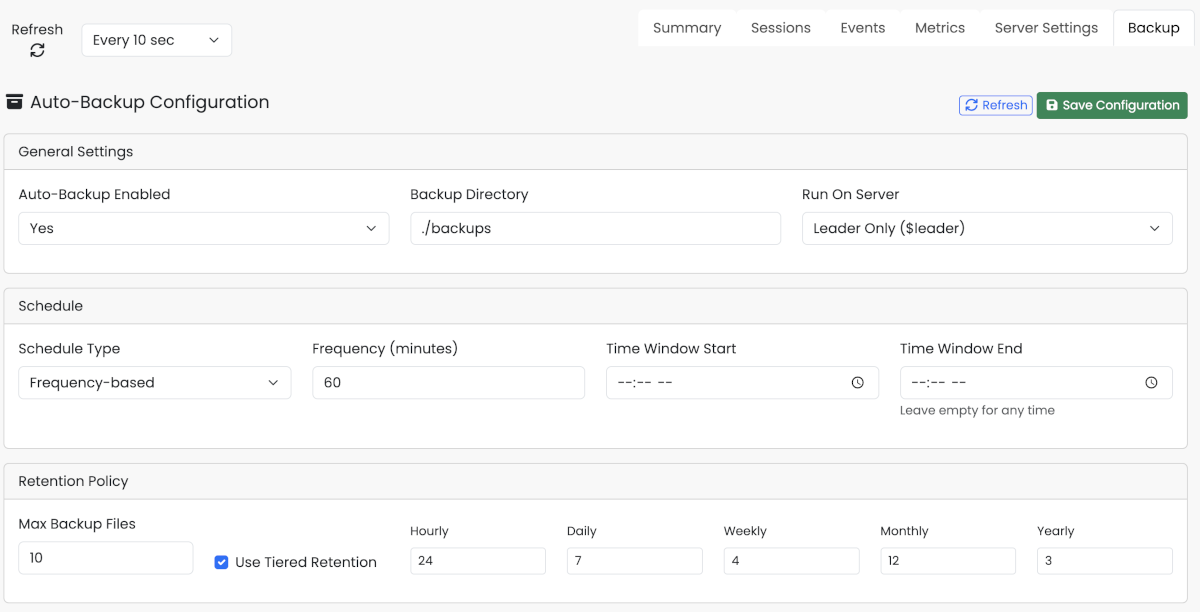
From the Studio, you can:
-
View and modify the backup configuration
-
Trigger immediate backups for any database
-
View the list of available backups per database
-
Monitor backup statistics and disk usage
Triggering Manual Backups
You can trigger an immediate backup through the Studio UI or via the HTTP API:
curl -X POST "http://localhost:2480/api/v1/server" \
  -u root:password \
  -H "Content-Type: application/json" \
-d '{"command": "trigger backup myDatabase"}'BACKUP DATABASEWhere an On-Demand Backup Goes
trigger backup, list backups, delete backup, restore backup and the SQL BACKUP DATABASE statement all use one
definition of the backup directory, so an archive one of them writes the others can see, whether or not the scheduler
is running. The directory is resolved in this order, first hit wins:
-
the
backupDirectoryof the running auto-backup plugin; -
the
backupDirectoryinconfig/backup.json, even when that file sets"enabled": false; -
the server setting
arcadedb.server.backupDirectory.
It is resolved per command, so a set backup config that moves the directory is picked up by the next one.
Archives always live under <backupDirectory>/<database>/. get backup config reports the resolved directory as
backupDirectory next to the configuration. A configured directory that fails validation (an absolute path, or one
escaping the server root) makes every backup command fail with an error naming it, where list backups used to
answer an empty list; get backup config reports the same failure as backupDirectoryError. A config/backup.json
that cannot be read or parsed is skipped with a warning in the server log, and the chain continues to the server
setting.
|
Since 26.10.1 the SQL As a consequence |
Retention runs only while the scheduler is enabled: with auto-backup off, an on-demand archive stays on disk until it is
removed with delete backup.
One Backup at a Time
A database is backed up by one backup at a time. If you ask for a backup while another one of the same database is still running - a manual trigger during a scheduled run, or two clicks in a row - the second request is refused rather than run alongside the first: a second copy of the same data adds nothing, and it would only compete for disk and CPU with the run already in progress.
The HTTP API answers with status 409 and the message A backup of database '<name>' is already in progress. Studio
shows the same message. A scheduled run that arrives at a busy moment is simply skipped, with a warning in the log, and
the next scheduled run covers the database as usual.
Database Lifecycle
Schedules follow their database, so you do not have to edit backup.json every time a database comes or goes:
-
A database created, restored or imported while the server is running is scheduled straight away, with the same defaults (or per-database override) any other database gets.
-
Dropping or closing a database cancels its schedule. The backups already on disk are left alone: a backup taken before the drop is exactly what you would restore from.
-
A scheduled backup never opens a database by itself. If the database is not available on this server when its turn comes, that run is skipped.
The last point matters when you close a database deliberately, for maintenance for example: the scheduler will not reopen it behind your back.
Troubleshooting
Backup scheduler not starting
Verify that:
-
The
backup.jsonfile exists in theconfigdirectory -
The JSON syntax is valid
-
The
enabledfield is set totrue -
Check the server log for error messages