Redis
ArcadeDB Server supports a subset of the Redis protocol. Please open an issue or a discussion on GitHub to support more commands.
If you’re using ArcadeDB as embedded, please add the dependency to the arcadedb-redisw library.
If you’re using Maven include this dependency in your pom.xml file.
<dependency>
    <groupId>com.arcadedb</groupId>
    <artifactId>arcadedb-redisw</artifactId>
    <version>26.10.2</version>
</dependency>
ArcadeDB Redis plugin works in 2 ways:
-
Manage transient (non-persistent) entries in the server. This is useful to manage user sessions and other records you don’t need to store in the database.
-
Manage persistent entries in the database. You can save and read any documents, vertices and edges from the underlying database.
Installation
To start the Redis plugin, enlist it in the server.plugins settings.
To specify multiple plugins, use the comma , as separator.
Example:
~/arcadedb $ bin/server.sh -Darcadedb.server.plugins="Redis:com.arcadedb.redis.RedisProtocolPlugin"If you’re using MS Windows OS, replace server.sh with server.bat.
In case you’re running ArcadeDB with Docker, open the port 6379 and use -e to pass settings:
docker run --rm -p 2480:2480 -p 6379:6379 \
        --env ARCADEDB_SETTINGS="-Darcadedb.server.rootPassword=playwithdata \
           -Darcadedb.server.plugins=Redis:com.arcadedb.redis.RedisProtocolPlugin " \
           arcadedata/arcadedb:latest
The Server output will contain this line:
2018-10-09 18:47:58:395 INFO <ArcadeDB_0> - Redis Protocol plugin started [ArcadeDBServer]How it works
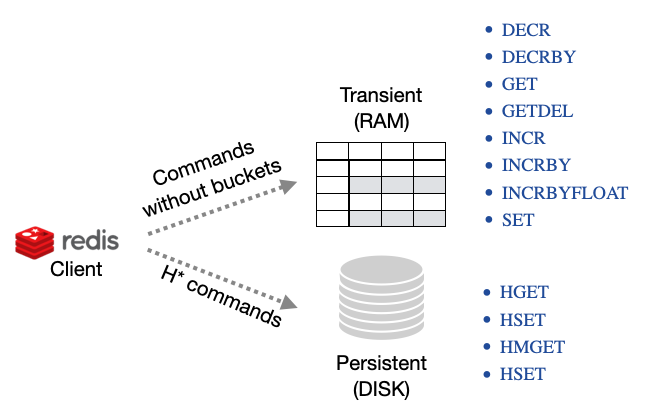
ArcadeDB works in 2 ways with the Redis protocol:
-
Transient commands, key/value pairs saved will be not saved in the database. This is perfect to store transient data, like user sessions.
-
Persistent commands, key/value pairs allows to store and retrieve ArcadeDB documents, vertices and edges
Transient (RAM Only) Commands
Below you can find the supported commands. The link takes you to the official Redis documentation. Please open an issue or a discussion on GitHub to support more commands.
The following commands do not take the bucket as a parameter because they work only in RAM on a shared (thread-safe) hashmap. This means all the stored values are reset when the server restarts.
INCR, DECR, INCRBY and INCRBYFLOAT are atomic, as they are in Redis: concurrent clients incrementing the same
key all count, and no update is lost. The guarantee is per server, though — these values are not replicated, so in
an HA cluster two clients incrementing through different nodes each update their own node’s copy. The
same applies to SET with NX/XX: it is a genuine check-and-set on one server, not a cluster-wide lock.
The commands check their argument count, over the Redis wire protocol and in the redis query language alike, and answer
wrong number of arguments for '<command>' command when it is wrong, as Redis does: INCR and DECR take the key only,
INCRBY, DECRBY and INCRBYFLOAT take the key and the amount (there is no default amount of 1), and a surplus argument
is refused, never read as an amount. Amounts and stored values of INCR, INCRBY, DECR and DECRBY must be plain 64-bit integers
(+5, 05 and -0 are refused with value is not an integer or out of range). INCRBYFLOAT replies and stores the result as
decimal text, as Redis does (0.1 plus 0.2 is 0.3, an integral result is 3, not 3.0), so INCR works on an integral result.
In the redis query language GET therefore returns a string for a key written by INCRBYFLOAT.
Available transient commands (in alphabetic order):
-
DECR, Decrement a value by 1
-
DECRBY, Decrement a value by a specific amount (64-bit precision)
-
EXISTS, Check if key exists
-
GET, Return the value associated with a key
-
GETDEL, Remove and return the value associated with a key
-
INCR, Increment a value by 1
-
INCRBY, Increment a value by a specific amount (64-bit precision)
-
INCRBYFLOAT, Increment a value by a specific amount expresses as a float (64-bit precision)
-
SET, Set a value associated with a key. The value is binary-safe: any bytes, valid UTF-8 or not, are returned unchanged by
GET. Keys are binary-safe too (see Keys); the other arguments of the commands (amounts, options, JSON documents, type and index names) are text.NX(only set if the key does not exist),XX(only set if the key already exists) andGET(return the previous value instead ofOK) are supported.EX/PX/EXAT/PXAT/KEEPTTLare rejected with an error rather than silently ignored, because transient keys in ArcadeDB have no expiry.
Keys
A key written as <database>.<key>, or a plain key after SELECT <database> (or with arcadedb.redis.defaultDatabase
set), lives in that database’s global variables, which SQL reads as $<key>. A plain key with no database lives in the
connection’s own map. Since v26.11.1 a key is the client’s key in both places, as in Redis:
-
every byte of a key counts, valid UTF-8 or not, so two binary keys that differ only in a byte that is not valid UTF-8 are two keys. Before, every such byte was replaced by the same character, so
SETof one key overwrote the other andGETDELof one deleted both; -
$kandkare two keys, and the names SQL reserves for its context (parent,current,depth,path,stack,history) are ordinary keys. Before, the leading$was stripped, so$kwas the keyk, and the reserved names were refused in a database’s key space while the connection’s own map took them.
A key SQL can name is still visible to it as $<key>. A reserved name stays SQL’s own: $parent or $depth in a SQL
statement never reads a Redis key of that name.
Persistent Commands
The following commands act on persistent buckets in the database.
Records (documents, vertices and edges) are always in form of JSON embedded in strings.
The bucket name is mapped as the database name first, then type, the index or the record’s RID based on the use case.
An index must exist on the property you used to retrieve the document, otherwise an error is returned.
For the sake of this tutorial, in a database MyDatabase, we’re going to create the account document type totally schemaless but for some indexed properties:
id as a unique long, email as a unique string and the pair firstName and lastName both strings and indexed with a composite key:
CREATE DOCUMENT TYPE Account;

CREATE PROPERTY Account.id LONG;
CREATE INDEX ON Account (id) UNIQUE;

CREATE PROPERTY Account.email STRING;
CREATE INDEX ON Account (email) UNIQUE;

CREATE PROPERTY Account.firstName STRING;
CREATE PROPERTY Account.lastName STRING;
CREATE INDEX ON Account (firstName,lastName) UNIQUE;
You can run the following Redis commands, for example, using the redis-cli tool; under Debian / Ubuntu this is part of the redis-tools package.
|
Now you can create a new document with Redis protocol and the HSET Redis command:
HSET MyDatabase Account "{'id':123,'email':'[email protected]','firstName':'Jay','lastName':'Miner'}"
The database and the type are two separate arguments: HSET <database> <type> <json>. Writing them as one argument (HSET MyDatabase.Account <json>) makes the plugin look for a database named MyDatabase.Account and fails with a "database does not exist" error.
|
To retrieve the document inserted above by id (O(logN) complexity), you can use the HGET Redis command:
HGET MyDatabase.Account[id] 123
"{'@rid':'#1:0','@type':'Account','id':123,'email':'[email protected]','firstName':'Jay','lastName':'Miner'}"
To retrieve the same document by email (O(logN) complexity), you can use the HGET Redis command:
HGET MyDatabase.Account[email] "[email protected]"
"{'@rid':'#1:0','@type':'Account','id':123,'email':'[email protected]','firstName':'Jay','lastName':'Miner'}"
To retrieve the same document by the pair firstName and lastName (O(logN) complexity), we are going to use the composite key we created before:
HGET MyDatabase.Account[firstName,lastName] "[\"Jay\",\"Miner\"]"
"{'@rid':'#1:0','@type':'Account','id':123,'email':'[email protected]','firstName':'Jay','lastName':'Miner'}"
To retrieve the document inserted above by it RID (O(1) complexity), you can use the HGET Redis command:
HGET MyDatabase "#1:0"
"{'@rid':'#1:0','@type':'Account','id':123,'email':'[email protected]','firstName':'Jay','lastName':'Miner'}"
You can also get multiple record in one call by using the HMGET Redis command:
HMGET MyDatabase "#1:0" "#1:1" "#1:2"
"{'@rid':'#1:0','@type':'Account','id':123,'email':'[email protected]','firstName':'Jay','lastName':'Miner'}"
"{'@rid':'#1:1','@type':'Account','id':232,'email':'[email protected]','firstName':'Jay','lastName':'Miner'}"
"{'@rid':'#1:2','@type':'Account','id':12,'email':'[email protected]','firstName':'Jay','lastName':'Miner'}"
Or the same, but by a key:
HMGET MyDatabase.Account[id] 123 232 12
"{'@rid':'#1:0','@type':'Account','id':123,'email':'[email protected]','firstName':'Jay','lastName':'Miner'}"
"{'@rid':'#1:1','@type':'Account','id':232,'email':'[email protected]','firstName':'Jay','lastName':'Miner'}"
"{'@rid':'#1:2','@type':'Account','id':12,'email':'[email protected]','firstName':'Jay','lastName':'Miner'}"
Or by a composite key, using the same […] JSON array form HGET takes. A key with no record keeps its
place in the reply as a null entry, so the Nth reply is always the answer to the Nth key:
HMGET MyDatabase.Account[firstName,lastName] "[\"Jay\",\"Miner\"]" "[\"Nobody\",\"Here\"]"
"{'@rid':'#1:0','@type':'Account','id':123,'email':'[email protected]','firstName':'Jay','lastName':'Miner'}"
(nil)
A RID that names no record is answered as "not there" by every command that takes one, on the Redis
protocol as in the redis query language: HGET replies (nil) (no result in the query language), HEXISTS 0,
HMGET a null entry and HDEL does not count it. (Since v26.11.1: HGET and HEXISTS replied
ERR Record … not found, and HGET in the query language failed with RecordNotFoundException.)
|
A key is matched against the index exactly as you wrote it, then converted to the indexed property’s
declared type. A key is therefore never guessed to be a number just because it looks like one: on a STRING
property, 007 finds the record whose value is the three characters 007, not the one whose value is 7.
|
While the index a lookup uses is being created, rebuilt or dropped, HGET, HMGET, HEXISTS and HDEL never
answer from a partial index: after a short retry they reply -TRYAGAIN, so a (nil) always means the key is not there.
Retry the command once the index change is over (since v26.10.2).
|
To delete the document inserted above by email, you can use the HDEL Redis command:
HDEL MyDatabase.Account[email] "[email protected]"
:1
The number HDEL replies is the number of records it removed. A key with no record is not counted, and neither is a
delete the database refused because a BeforeRecordDeleteListener vetoed it. Likewise the number the persistent HSET replies
is the number of records it stored: a create a BeforeRecordCreateListener vetoed is not counted. A multi-key HDEL or HSET is one unit of work,
on the Redis protocol as in the redis query language: if it fails on one key, no earlier key of the same command stays
deleted or stored, and a conflict is retried. The transient form of HSET checks every JSON object before it stores the
first (since v26.10.2).
|
The returning JSON could have a different ordering of the properties from the one you have inserted.
This is because JSON doesn’t maintain the order of properties, but only of arrays ([]).
|
Available persistent commands (in alphabetic order):
-
HDEL, Delete one or more records by a key, a composite key or record’s id.
HDEL <database> <rid> [<rid> …]deletes those records and replies with how many it deleted -
HEXISTS, Check if a key exists
-
HGET, Retrieve a record by a key, a composite key or record’s id
-
HMGET, Retrieve multiple records by a key, a composite key or record’s id
-
HSET, Create and update one or more records by a key, a composite key or record’s id
Available miscellaneous commands:
-
PING, Returns its argument (for testing server readiness or latency)
Settings
To change the host where the Redis protocol is listening, set the setting arcadedb.redis.host. A name that resolves to several local addresses, such as localhost (127.0.0.1 and ::1), is bound on every one of them.
By default, is 0.0.0.0 which means listen to all the configured network interfaces.
To change the default port (6379) set arcadedb.redis.port.
Listing and terminating running commands
Since v26.10.2 every command a Redis client sends, except PING and SELECT, is listed while it runs by the HTTP
list queries server command and by Cypher SHOW TRANSACTIONS,
with protocol redis, the command line as its text, the connection’s name as connectionId and the client’s
address. terminate query, TERMINATE TRANSACTIONS or the Studio Running Queries
tab stop it, and the client receives an ERR error saying that it was terminated. root sees and stops every
command, any other user only their own.
Since v26.11.1 the commands on keys held in memory (GET, SET, GETDEL, EXISTS, INCR, INCRBY,
INCRBYFLOAT, DECR, DECRBY) are neither listed nor held by the query admission
control: each is a single in-memory map operation, done before a listing could show it. They are no longer refused
with TRYAGAIN when the server is busy. The commands that read or write records (HSET, HGET, HMGET, HEXISTS,
HDEL) are still listed and gated.
Pipelining
Since v26.11.1 the replies to pipelined commands are sent together, when the client has no more commands waiting, instead of one network write per reply. A client that pipelines (most Redis clients can) gets several times the throughput of one that waits for each reply.
Writes refused by an HA replica
Since v26.10.2 a write that an HA replica refuses and that names the leader is answered with a READONLY error, the
reply Redis itself gives to a write sent to a replica, and the text ends with The leader is server '<address>'. A
Sentinel-aware client reconnects to the leader on it. During an election, when no leader is known yet, the refusal names
nobody and keeps the retryable TRYAGAIN. In 26.10.1 and earlier every such refusal was a TRYAGAIN without the
address, so the client retried the same replica. See how-to/operations/ha.adoc#ha-leader-refusal.
A database that is not available
Since v26.11.1 a command that names a database an overwrite restore is about to replace, or that a close database
command closed, is answered with a LOADING error, the reply Redis itself gives while it holds a dataset it cannot
serve yet, and the client retries later. Before, it was answered with a generic ERR as for a server fault. A key written
as <database>.<key>, and SELECT <database>, are refused the same way: the key used to be kept as a plain key of the
connection and acknowledged with OK, and the value was missing from the database once it was available again. A name
that is not a database keeps its meaning, a plain key for <name>.<key> and Database '<name>' not found for SELECT.
See reference/http-api/http.adoc#http-open-on-demand.
Since v26.11.1 a database that is on disk and not open yet, which with arcadedb.server.loadAtStartup=false is every
database until its first request, is a database too: <database>.<key> and SELECT <database> open it. Before, its key
was kept as a plain key of the connection and acknowledged with OK, and SELECT answered Database '<name>' not found.
A database an interrupted HA snapshot install left pending is answered with LOADING until the install is reconciled. A
directory of the database directory that holds no database is not one, whatever its name.
Redis via HTTP API
In addition to the native Redis wire protocol, ArcadeDB also supports Redis commands as a query language via the HTTP API.
This allows you to execute Redis commands through the standard ArcadeDB HTTP /command endpoint by specifying language=redis.
This is useful when:
-
You want to use Redis commands without a Redis client library
-
You need to integrate Redis operations into existing HTTP-based workflows
-
You want to combine Redis commands with other ArcadeDB query languages in the same application
Basic Usage
To execute Redis commands via HTTP, send a POST request to the /command endpoint with language set to redis:
curl -X POST "http://localhost:2480/api/v1/command/MyDatabase" \
  -H "Content-Type: application/json" \
  -u root:password \
  -d '{"language": "redis", "command": "PING"}'
Response:
{"result": [{"value": "PONG"}]}Supported Commands
All transient and persistent commands documented above are available via the HTTP API.
Examples of transient commands:
# SET a value
curl -X POST "http://localhost:2480/api/v1/command/MyDatabase" \
  -H "Content-Type: application/json" \
  -u root:password \
  -d '{"language": "redis", "command": "SET mykey myvalue"}'

# GET a value
curl -X POST "http://localhost:2480/api/v1/command/MyDatabase" \
  -H "Content-Type: application/json" \
  -u root:password \
  -d '{"language": "redis", "command": "GET mykey"}'

# INCREMENT a counter
curl -X POST "http://localhost:2480/api/v1/command/MyDatabase" \
  -H "Content-Type: application/json" \
  -u root:password \
  -d '{"language": "redis", "command": "INCR counter"}'
Examples of persistent commands:
# Store a document
curl -X POST "http://localhost:2480/api/v1/command/MyDatabase" \
  -H "Content-Type: application/json" \
  -u root:password \
  -d '{"language": "redis", "command": "HSET Account {\"id\":1,\"name\":\"John\",\"age\":30}"}'

# Retrieve by index
curl -X POST "http://localhost:2480/api/v1/command/MyDatabase" \
  -H "Content-Type: application/json" \
  -u root:password \
  -d '{"language": "redis", "command": "HGET Account[id] 1"}'
Batch Commands
You can execute multiple commands in a single request by separating them with newlines. Each command is executed sequentially and an array of results is returned.
curl -X POST "http://localhost:2480/api/v1/command/MyDatabase" \
  -H "Content-Type: application/json" \
  -u root:password \
  -d '{"language": "redis", "command": "SET key1 value1\nSET key2 value2\nGET key1\nGET key2"}'
Response:
{"result": [{"value": ["OK", "OK", "value1", "value2"]}]}Comments are supported within batch commands using # or // prefixes:
# This is a comment
SET key1 value1
// This is also a comment
SET key2 value2
Transactions with MULTI/EXEC
Redis transactions are supported using the standard MULTI and EXEC commands.
Commands between MULTI and EXEC are queued and executed atomically.
curl -X POST "http://localhost:2480/api/v1/command/MyDatabase" \
  -H "Content-Type: application/json" \
  -u root:password \
  -d '{"language": "redis", "command": "MULTI\nSET tx1 value1\nSET tx2 value2\nINCR counter\nEXEC"}'
Response (array of results from each command in the transaction):
{"result": [{"value": ["OK", "OK", 1]}]}(Since v26.10.1: if the transaction hit an internal conflict and had to retry automatically, the reply could contain
extra or duplicated entries instead of exactly one result per queued command. HSET and HDEL could be affected the
same way on their own automatic retries. This is now fixed.)
RAM commands inside a transaction. The RAM commands are not stored in the database, so a transaction treats them in two different ways, depending on whether the caller acts on their reply:
-
SETfollows the transaction. While a transaction is active (aMULTI/EXECblock, the transaction the HTTP command endpoint runs every request in, or one your application opened), the new value is visible to that transaction only, is published when the transaction commits, and is discarded if it rolls back. A block that fails, for example on a duplicated key, leaves noSETbehind. -
INCR,INCRBY,INCRBYFLOAT,DECR,DECRBYandGETDELare applied atomically at the moment they run, as in Redis, so no two clients can ever receive the same counter value or claim the same key. When ArcadeDB retries a block automatically after a conflict, the retry reuses the value the first attempt obtained instead of applying the command a second time. If the block ultimately fails, the increment is not given back, just as a database sequence is not: the next caller gets the next value, leaving a gap. On a key the same transaction alreadySET, these commands work on the transaction’s own value and follow the transaction like theSET.
(Since v26.10.1. Before, an automatic retry applied these commands once per attempt, so one EXEC could advance a
counter twice, and a SET in a block that failed was still applied.)
The DISCARD command can be used to abort a transaction:
curl -X POST "http://localhost:2480/api/v1/command/MyDatabase" \
  -H "Content-Type: application/json" \
  -u root:password \
  -d '{"language": "redis", "command": "MULTI\nSET discarded value\nDISCARD"}'
A batch can mix transaction blocks and standalone commands, and runs every line in order: a command outside a block
runs on its own, the commands between MULTI and EXEC run as one atomic transaction, and the commands between
MULTI and DISCARD are dropped. The reply holds one entry per command that ran, in batch order (the commands of a
committed block included), so a batch with no DISCARD answers exactly one entry per command. A batch whose only
content is a discarded block answers "OK".
curl -X POST "http://localhost:2480/api/v1/command/MyDatabase" \
  -H "Content-Type: application/json" \
  -u root:password \
  -d '{"language": "redis", "command": "SET a 1\nMULTI\nINCR a\nSET b x\nEXEC\nGET b"}'
{"result": [{"value": ["OK", 2, "OK", "x"]}]}The whole batch is checked before any command runs. EXEC or DISCARD without MULTI, a nested MULTI and a
MULTI never closed by EXEC or DISCARD are refused with an error, and none of the batch’s commands is executed.
|
Since v26.10.1. Before, the batch stopped at its first |
Programmatic Access
You can also use Redis commands directly from Java code via the query engine:
try (ResultSet rs = database.query("redis", "PING")) {
    Result result = rs.next();
    String value = result.getProperty("value"); // Returns "PONG"
}

// SET and GET
database.command("redis", "SET mykey myvalue");
try (ResultSet rs = database.query("redis", "GET mykey")) {
    String value = rs.next().getProperty("value"); // Returns "myvalue"
}