Redis
ArcadeDB Server supports a subset of the Redis protocol. Please open an issue or a discussion on GitHub to support more commands.
If you’re using ArcadeDB as embedded, please add the dependency to the arcadedb-redisw library.
If you’re using Maven include this dependency in your pom.xml file.
<dependency>
    <groupId>com.arcadedb</groupId>
    <artifactId>arcadedb-redisw</artifactId>
    <version>26.10.1</version>
</dependency>
ArcadeDB Redis plugin works in 2 ways:
-
Manage transient (non-persistent) entries in the server. This is useful to manage user sessions and other records you don’t need to store in the database.
-
Manage persistent entries in the database. You can save and read any documents, vertices and edges from the underlying database.
Installation
To start the Redis plugin, enlist it in the server.plugins settings.
To specify multiple plugins, use the comma , as separator.
Example:
~/arcadedb $ bin/server.sh -Darcadedb.server.plugins="Redis:com.arcadedb.redis.RedisProtocolPlugin"If you’re using MS Windows OS, replace server.sh with server.bat.
In case you’re running ArcadeDB with Docker, open the port 6379 and use -e to pass settings:
docker run --rm -p 2480:2480 -p 6379:6379 \
        --env ARCADEDB_SETTINGS="-Darcadedb.server.rootPassword=playwithdata \
           -Darcadedb.server.plugins=Redis:com.arcadedb.redis.RedisProtocolPlugin " \
           arcadedata/arcadedb:latest
The Server output will contain this line:
2018-10-09 18:47:58:395 INFO <ArcadeDB_0> - Redis Protocol plugin started [ArcadeDBServer]How it works
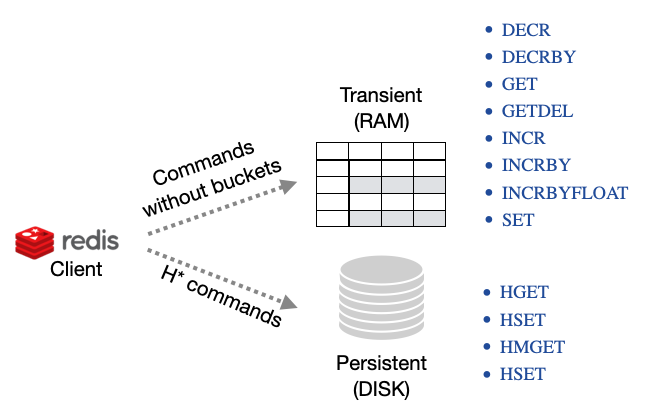
ArcadeDB works in 2 ways with the Redis protocol:
-
Transient commands, key/value pairs saved will be not saved in the database. This is perfect to store transient data, like user sessions.
-
Persistent commands, key/value pairs allows to store and retrieve ArcadeDB documents, vertices and edges
Transient (RAM Only) Commands
Below you can find the supported commands. The link takes you to the official Redis documentation. Please open an issue or a discussion on GitHub to support more commands.
The following commands do not take the bucket as a parameter because they work only in RAM on a shared (thread-safe) hashmap. This means all the stored values are reset when the server restarts.
INCR, DECR, INCRBY and INCRBYFLOAT are atomic, as they are in Redis: concurrent clients incrementing the same
key all count, and no update is lost. The guarantee is per server, though — these values are not replicated, so in
an HA cluster two clients incrementing through different nodes each update their own node’s copy. The
same applies to SET with NX/XX: it is a genuine check-and-set on one server, not a cluster-wide lock.
The commands check their argument count, over the Redis wire protocol and in the redis query language alike, and answer
wrong number of arguments for '<command>' command when it is wrong, as Redis does: INCR and DECR take the key only,
INCRBY, DECRBY and INCRBYFLOAT take the key and the amount (there is no default amount of 1), and a surplus argument
is refused, never read as an amount. Amounts and stored values of INCR, INCRBY, DECR and DECRBY must be plain 64-bit integers
(+5, 05 and -0 are refused with value is not an integer or out of range). INCRBYFLOAT replies and stores the result as
decimal text, as Redis does (0.1 plus 0.2 is 0.3, an integral result is 3, not 3.0), so INCR works on an integral result.
In the redis query language GET therefore returns a string for a key written by INCRBYFLOAT.
Available transient commands (in alphabetic order):
-
DECR, Decrement a value by 1
-
DECRBY, Decrement a value by a specific amount (64-bit precision)
-
EXISTS, Check if key exists
-
GET, Return the value associated with a key
-
GETDEL, Remove and return the value associated with a key
-
INCR, Increment a value by 1
-
INCRBY, Increment a value by a specific amount (64-bit precision)
-
INCRBYFLOAT, Increment a value by a specific amount expresses as a float (64-bit precision)
-
SET, Set a value associated with a key. The value is binary-safe: any bytes, valid UTF-8 or not, are returned unchanged by
GET. Keys and the arguments of the other commands are text.NX(only set if the key does not exist),XX(only set if the key already exists) andGET(return the previous value instead ofOK) are supported.EX/PX/EXAT/PXAT/KEEPTTLare rejected with an error rather than silently ignored, because transient keys in ArcadeDB have no expiry.
Persistent Commands
The following commands act on persistent buckets in the database.
Records (documents, vertices and edges) are always in form of JSON embedded in strings.
The bucket name is mapped as the database name first, then type, the index or the record’s RID based on the use case.
An index must exist on the property you used to retrieve the document, otherwise an error is returned.
For the sake of this tutorial, in a database MyDatabase, we’re going to create the account document type totally schemaless but for some indexed properties:
id as a unique long, email as a unique string and the pair firstName and lastName both strings and indexed with a composite key:
CREATE DOCUMENT TYPE Account;

CREATE PROPERTY Account.id LONG;
CREATE INDEX ON Account (id) UNIQUE;

CREATE PROPERTY Account.email STRING;
CREATE INDEX ON Account (email) UNIQUE;

CREATE PROPERTY Account.firstName STRING;
CREATE PROPERTY Account.lastName STRING;
CREATE INDEX ON Account (firstName,lastName) UNIQUE;
You can run the following Redis commands, for example, using the redis-cli tool; under Debian / Ubuntu this is part of the redis-tools package.
|
Now you can create a new document with Redis protocol and the HSET Redis command:
HSET MyDatabase Account "{'id':123,'email':'[email protected]','firstName':'Jay','lastName':'Miner'}"
The database and the type are two separate arguments: HSET <database> <type> <json>. Writing them as one argument (HSET MyDatabase.Account <json>) makes the plugin look for a database named MyDatabase.Account and fails with a "database does not exist" error.
|
To retrieve the document inserted above by id (O(logN) complexity), you can use the HGET Redis command:
HGET MyDatabase.Account[id] 123
"{'@rid':'#1:0','@type':'Account','id':123,'email':'[email protected]','firstName':'Jay','lastName':'Miner'}"
To retrieve the same document by email (O(logN) complexity), you can use the HGET Redis command:
HGET MyDatabase.Account[email] "[email protected]"
"{'@rid':'#1:0','@type':'Account','id':123,'email':'[email protected]','firstName':'Jay','lastName':'Miner'}"
To retrieve the same document by the pair firstName and lastName (O(logN) complexity), we are going to use the composite key we created before:
HGET MyDatabase.Account[firstName,lastName] "[\"Jay\",\"Miner\"]"
"{'@rid':'#1:0','@type':'Account','id':123,'email':'[email protected]','firstName':'Jay','lastName':'Miner'}"
To retrieve the document inserted above by it RID (O(1) complexity), you can use the HGET Redis command:
HGET MyDatabase "#1:0"
"{'@rid':'#1:0','@type':'Account','id':123,'email':'[email protected]','firstName':'Jay','lastName':'Miner'}"
You can also get multiple record in one call by using the HMGET Redis command:
HMGET MyDatabase "#1:0" "#1:1" "#1:2"
"{'@rid':'#1:0','@type':'Account','id':123,'email':'[email protected]','firstName':'Jay','lastName':'Miner'}"
"{'@rid':'#1:1','@type':'Account','id':232,'email':'[email protected]','firstName':'Jay','lastName':'Miner'}"
"{'@rid':'#1:2','@type':'Account','id':12,'email':'[email protected]','firstName':'Jay','lastName':'Miner'}"
Or the same, but by a key:
HMGET MyDatabase.Account[id] 123 232 12
"{'@rid':'#1:0','@type':'Account','id':123,'email':'[email protected]','firstName':'Jay','lastName':'Miner'}"
"{'@rid':'#1:1','@type':'Account','id':232,'email':'[email protected]','firstName':'Jay','lastName':'Miner'}"
"{'@rid':'#1:2','@type':'Account','id':12,'email':'[email protected]','firstName':'Jay','lastName':'Miner'}"
Or by a composite key, using the same […] JSON array form HGET takes. A key with no record keeps its
place in the reply as a null entry, so the Nth reply is always the answer to the Nth key:
HMGET MyDatabase.Account[firstName,lastName] "[\"Jay\",\"Miner\"]" "[\"Nobody\",\"Here\"]"
"{'@rid':'#1:0','@type':'Account','id':123,'email':'[email protected]','firstName':'Jay','lastName':'Miner'}"
(nil)
A key is matched against the index exactly as you wrote it, then converted to the indexed property’s
declared type. A key is therefore never guessed to be a number just because it looks like one: on a STRING
property, 007 finds the record whose value is the three characters 007, not the one whose value is 7.
|
To delete the document inserted above by email, you can use the HDEL Redis command:
HDEL MyDatabase.Account[email] "[email protected]"
:1
The returning JSON could have a different ordering of the properties from the one you have inserted.
This is because JSON doesn’t maintain the order of properties, but only of arrays ([]).
|
Available persistent commands (in alphabetic order):
-
HDEL, Delete one or more records by a key, a composite key or record’s id.
HDEL <database> <rid> [<rid> …]deletes those records and replies with how many it deleted -
HEXISTS, Check if a key exists
-
HGET, Retrieve a record by a key, a composite key or record’s id
-
HMGET, Retrieve multiple records by a key, a composite key or record’s id
-
HSET, Create and update one or more records by a key, a composite key or record’s id
Available miscellaneous commands:
-
PING, Returns its argument (for testing server readiness or latency)
Settings
To change the host where the Redis protocol is listening, set the setting arcadedb.redis.host. A name that resolves to several local addresses, such as localhost (127.0.0.1 and ::1), is bound on every one of them.
By default, is 0.0.0.0 which means listen to all the configured network interfaces.
To change the default port (6379) set arcadedb.redis.port.
Redis via HTTP API
In addition to the native Redis wire protocol, ArcadeDB also supports Redis commands as a query language via the HTTP API.
This allows you to execute Redis commands through the standard ArcadeDB HTTP /command endpoint by specifying language=redis.
This is useful when:
-
You want to use Redis commands without a Redis client library
-
You need to integrate Redis operations into existing HTTP-based workflows
-
You want to combine Redis commands with other ArcadeDB query languages in the same application
Basic Usage
To execute Redis commands via HTTP, send a POST request to the /command endpoint with language set to redis:
curl -X POST "http://localhost:2480/api/v1/command/MyDatabase" \
  -H "Content-Type: application/json" \
  -u root:password \
  -d '{"language": "redis", "command": "PING"}'
Response:
{"result": [{"value": "PONG"}]}Supported Commands
All transient and persistent commands documented above are available via the HTTP API.
Examples of transient commands:
# SET a value
curl -X POST "http://localhost:2480/api/v1/command/MyDatabase" \
  -H "Content-Type: application/json" \
  -u root:password \
  -d '{"language": "redis", "command": "SET mykey myvalue"}'

# GET a value
curl -X POST "http://localhost:2480/api/v1/command/MyDatabase" \
  -H "Content-Type: application/json" \
  -u root:password \
  -d '{"language": "redis", "command": "GET mykey"}'

# INCREMENT a counter
curl -X POST "http://localhost:2480/api/v1/command/MyDatabase" \
  -H "Content-Type: application/json" \
  -u root:password \
  -d '{"language": "redis", "command": "INCR counter"}'
Examples of persistent commands:
# Store a document
curl -X POST "http://localhost:2480/api/v1/command/MyDatabase" \
  -H "Content-Type: application/json" \
  -u root:password \
  -d '{"language": "redis", "command": "HSET Account {\"id\":1,\"name\":\"John\",\"age\":30}"}'

# Retrieve by index
curl -X POST "http://localhost:2480/api/v1/command/MyDatabase" \
  -H "Content-Type: application/json" \
  -u root:password \
  -d '{"language": "redis", "command": "HGET Account[id] 1"}'
Batch Commands
You can execute multiple commands in a single request by separating them with newlines. Each command is executed sequentially and an array of results is returned.
curl -X POST "http://localhost:2480/api/v1/command/MyDatabase" \
  -H "Content-Type: application/json" \
  -u root:password \
  -d '{"language": "redis", "command": "SET key1 value1\nSET key2 value2\nGET key1\nGET key2"}'
Response:
{"result": [{"value": ["OK", "OK", "value1", "value2"]}]}Comments are supported within batch commands using # or // prefixes:
# This is a comment
SET key1 value1
// This is also a comment
SET key2 value2
Transactions with MULTI/EXEC
Redis transactions are supported using the standard MULTI and EXEC commands.
Commands between MULTI and EXEC are queued and executed atomically.
curl -X POST "http://localhost:2480/api/v1/command/MyDatabase" \
  -H "Content-Type: application/json" \
  -u root:password \
  -d '{"language": "redis", "command": "MULTI\nSET tx1 value1\nSET tx2 value2\nINCR counter\nEXEC"}'
Response (array of results from each command in the transaction):
{"result": [{"value": ["OK", "OK", 1]}]}(Since v26.10.1: if the transaction hit an internal conflict and had to retry automatically, the reply could contain
extra or duplicated entries instead of exactly one result per queued command. HSET and HDEL could be affected the
same way on their own automatic retries. This is now fixed.)
RAM commands inside a transaction. The RAM commands are not stored in the database, so a transaction treats them in two different ways, depending on whether the caller acts on their reply:
-
SETfollows the transaction. While a transaction is active (aMULTI/EXECblock, the transaction the HTTP command endpoint runs every request in, or one your application opened), the new value is visible to that transaction only, is published when the transaction commits, and is discarded if it rolls back. A block that fails, for example on a duplicated key, leaves noSETbehind. -
INCR,INCRBY,INCRBYFLOAT,DECR,DECRBYandGETDELare applied atomically at the moment they run, as in Redis, so no two clients can ever receive the same counter value or claim the same key. When ArcadeDB retries a block automatically after a conflict, the retry reuses the value the first attempt obtained instead of applying the command a second time. If the block ultimately fails, the increment is not given back, just as a database sequence is not: the next caller gets the next value, leaving a gap. On a key the same transaction alreadySET, these commands work on the transaction’s own value and follow the transaction like theSET.
(Since v26.10.1. Before, an automatic retry applied these commands once per attempt, so one EXEC could advance a
counter twice, and a SET in a block that failed was still applied.)
The DISCARD command can be used to abort a transaction:
curl -X POST "http://localhost:2480/api/v1/command/MyDatabase" \
  -H "Content-Type: application/json" \
  -u root:password \
  -d '{"language": "redis", "command": "MULTI\nSET discarded value\nDISCARD"}'
A batch can mix transaction blocks and standalone commands, and runs every line in order: a command outside a block
runs on its own, the commands between MULTI and EXEC run as one atomic transaction, and the commands between
MULTI and DISCARD are dropped. The reply holds one entry per command that ran, in batch order (the commands of a
committed block included), so a batch with no DISCARD answers exactly one entry per command. A batch whose only
content is a discarded block answers "OK".
curl -X POST "http://localhost:2480/api/v1/command/MyDatabase" \
  -H "Content-Type: application/json" \
  -u root:password \
  -d '{"language": "redis", "command": "SET a 1\nMULTI\nINCR a\nSET b x\nEXEC\nGET b"}'
{"result": [{"value": ["OK", 2, "OK", "x"]}]}The whole batch is checked before any command runs. EXEC or DISCARD without MULTI, a nested MULTI and a
MULTI never closed by EXEC or DISCARD are refused with an error, and none of the batch’s commands is executed.
|
Since v26.10.1. Before, the batch stopped at its first |
Programmatic Access
You can also use Redis commands directly from Java code via the query engine:
try (ResultSet rs = database.query("redis", "PING")) {
    Result result = rs.next();
    String value = result.getProperty("value"); // Returns "PONG"
}

// SET and GET
database.command("redis", "SET mykey myvalue");
try (ResultSet rs = database.query("redis", "GET mykey")) {
    String value = rs.next().getProperty("value"); // Returns "myvalue"
}